Introduction
pydggsapi runs on python3. It provides an easy setup for users to publish DGGS-enabled data sources. It uses FastAPI as the core component to implement the OGC DGGS API standard. pydggsapi also aims to provide a flexible structure that can easily extend to support different DGGRS and data storage. The following diagram shows the overall structure of pydggsapi:
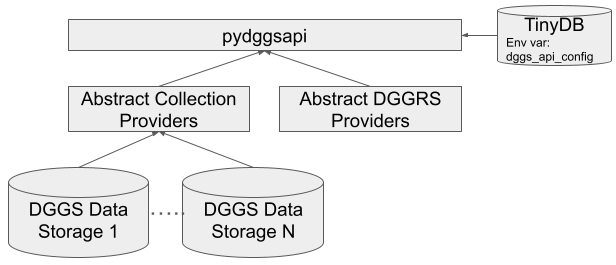
pydggsapi uses TinyDB to store the definitions of collections, DGGRS providers and collection providers. You can specify the path of the DB in the environment variable dggs_api_config.
This structure provides two abstract class definitions that allow developers to quickly implement new DGGRS and Collection providers to work with pydggsapi. The DGGRS and collections providers serve as accessors to collections. Currently, it supports:
Quick setup
In order to work with IGEO7 (using DGGRID), the dggrid executable needs to be available. You can compile it yourself, or install into the conda/micromamba environment from conda-forge:
micromamba install -c conda-forge dggrid
export DGGRID_PATH = <path to dggrid executable>
Install pydggsapi using pypi (under the same virtual environment of
dggrid):
pip install pydggsapi
or install the latest updates from GitHub (under the same virtual environment of dggrid):
pip install git+https://github.com/LandscapeGeoinformatics/pydggsapi.git
create a local
.envfile from theenv.sample. Change the environment variables according to your local environment setup. Please refer to the configuration for more details.
dggs_api_config=<Path to TinyDB>
DGGRID_PATH=<Path to dggrid executable>
Start the server:
pydggsapi
Docker build
We have now a Dockerfile (thanks to CRIM/https://github.com/fmigneault) that allows you to easily build and run pydggsapi in a containerized environment.
You can build the docker image using the following command:
docker build -t pydggsapi:tag -f docker/Dockerfile .
Quick setup for development
setup virtual environment with micromamba file and active it.
git clone https://github.com/LandscapeGeoinformatics/pydggsapi.git
cd pydggsapi
micromamba create -n <name>  -f micromamba_env.yaml
mircomamba activate <name>
In order to work with IGEO7 (using DGGRID), the dggrid executable needs to be available. You can compile it yourself, or install into the conda/micromamba environment from conda-forge:
micromamba install -c conda-forge dggrid
run poetry to install dependencies
poetry install
create a local
.envfile from theenv.sample. Change the environment variables according to your local environment setup.
dggs_api_config=<Path to TinyDB>
DGGRID_PATH=<Path to dggrid executable>
Start the server:
pydggsapi