Zarr Collection Provider
The implementation uses xarray.Datatree as the driver to access Zarr data. The provider serves multiple Zarr data sources. At the initialisation stage, it loads the datasources setting from the initial_params to get each Zarr data configuration, then it creates an xarray datatree handler for each of them and stores it under self.datasources with the id as the key.
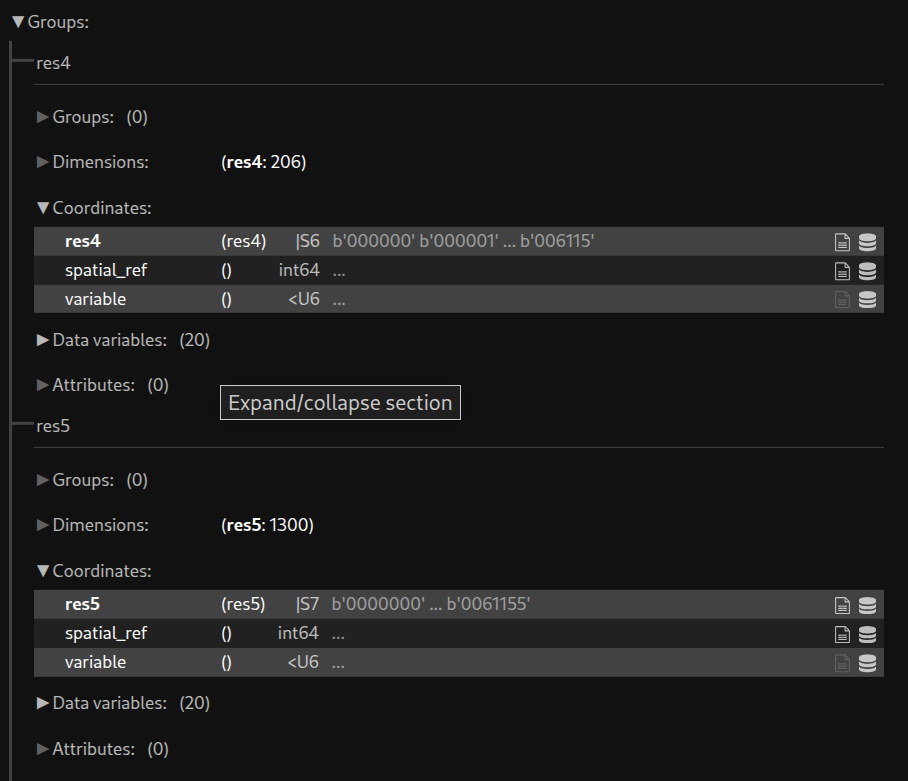
Each group of the Zarr data source represents data from the same refinement level, with zone IDs as the index. Here is an example of how Zarr data is organised.
Constructor parameters
For initial_params uses in collection_providers
It is a nested dictionary. At the root level, the dictionary datasources contains information about one or more Zarr data sources in the form of a child dictionary. The key of the child dictionary represents the unique ID for the Zarr data. Currently, only local storage is supported.
An example to define a Zarr collection provider:
"collection_providers": {"1":
        {"zarr":
            {"classname": "zarr_collection_provider.ZarrCollectionProvider",
              "initial_params":
                      { "datasources": {
                                "my_zarr_data": {
                                    "filepath": "<path to zarr folder>",
                                    "zones_grps" : { "4": "res4", "5": "res5"}
                                }
                        }
                    }
            }
        }
}
For each Zarr data, two parameters are required:
filepath: the local directory path of the data.zones_grps: a dictionary that maps refinement level to group name of the data
get_data parameters
For getdata_params uses in collections
datasource_id: the unique ID defines for a Zarr data underinitial_params
A collection example of using Zarr collection provider :
"collections": {"1":
                {"suitability_hytruck_zarr":
                    {
                     "title": "Suitability Modelling for Hytruck in Zarr Data format",
                     "description": "Desc",
                     "collection_provider": {
                              "providerId": "zarr",
                              "dggrsId": "igeo7",
                               "maxzonelevel": 5,
                               "getdata_params": {
                                       "datasource_id" : "my_zarr_data"
                                }
                        }
                    }
                }
            }