Parquet Collection Provider
The implementation uses duckdb as the driver to access the data in parquet format. The duckdb starts in in-memory mode and uses the extension httpfs for cloud storage access. Each data source has its own duckdb.DuckDBPyConnection object from the duckdb.connect() function, and sets up the secret if needed for the connection.
Therefore, multiple cloud providers can be supported by the same parquet providers and different bucket credentials. All data source info are stored as a dictionary in self.datasources for retrieval. The key of the dictionary represents the ID of the data source.
ParquetDatasourceInfo
filepath: String. A file path of the data source. Supports both local, gcs and s3 cloud storage.id_col: String. The column name of the zone IDs.credential: String that is in the form of temporary secrets from duckdb. To specify a custom s3 endpoint, please refer here.conn: duckdb object to store the connection.
Organisation of the dataset with multiple refinement levels
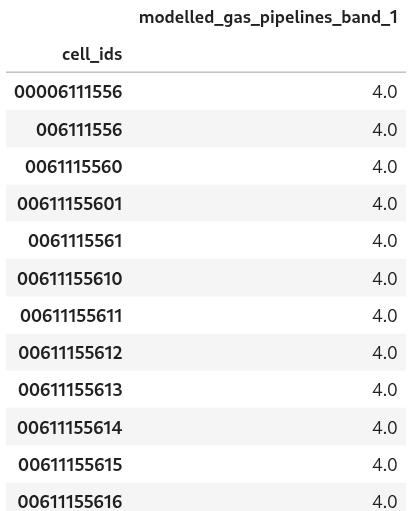
The user must arrange all zone IDs at different refinement levels into a single column (e.g. cell_id), and ensure that the data at coarser refinement levels is aggregated; the provider doesn’t perform any aggregation on the fly. An example screenshot of a parquet dataset with multiple refinement levels is shown below.
Class initialisation
The dictionary datasources contains information about the parquet data sources. User defines the parquet data sources as child dictionaries under datasources. The key of the child dictionary represents the unique ID for the parquet data.
An example to define a Parquet collection provider:
"collection_providers": {"1":
{
  "parquet": {
    "classname": "parquet_collection_provider.ParquetCollectionProvider",
      "datasources": {
        "hytruck": {
          "filepath": "gcs://<path to parquet file>",
          "id_col": "cell_ids",
          "data_cols": ["*"],
          "exclude_data_cols": ["data_1"],
          "credential": "TYPE gcs, KEY_ID 'myKEY', SECRET 'secretKEY'"
        }
      }
  }
}